
Features
What DFIRe does.
One licence turns all of it on. There are no feature tiers and no per-seat arithmetic, so the only question is whether DFIRe fits how your team works. Every capability below links to its documentation.
01Running a case
Work the case in one place.
A case holds the work: actions, notes, files, evidence, indicators and the report. A triage investigation becomes an incident without a handover or a second tool.
Ransomware Attack - LockBit 3.0 Encrypts Finance File Shares
Cases and projects
Open a case with your own case types, severities and entities. Group related cases into a project when one intrusion turns into several.
CasesActions and phases
The playbook fills each phase with its actions. Assign them to people or teams, block what is waiting on something, and post each completion to the timeline.
Incident responsePlaybooks and runbooks
Fifteen case types come with a default playbook, so a new case starts with the right steps rather than a blank page. Runbooks hold the how for a single action or evidence item.
PlaybooksTimeline
One ordered account of what happened and what you did about it. Entries come from the team and from the system, and the timeline goes into the report.
TimelineCompliance timers
Track the deadlines you answer for, like GDPR breach notification. Define your own timers, watch the time remaining on the case, and get a reminder while it still matters.
Compliance timersReports
Write the report where the evidence already is. You define the sections. DFIRe generates the inventories and timelines, and a QA step keeps a second reader in the process.
Reports02Evidence and custody
Record custody as the work happens.
Nobody has to rebuild the story from tickets and memory a year later, when someone asks who held the evidence and when.
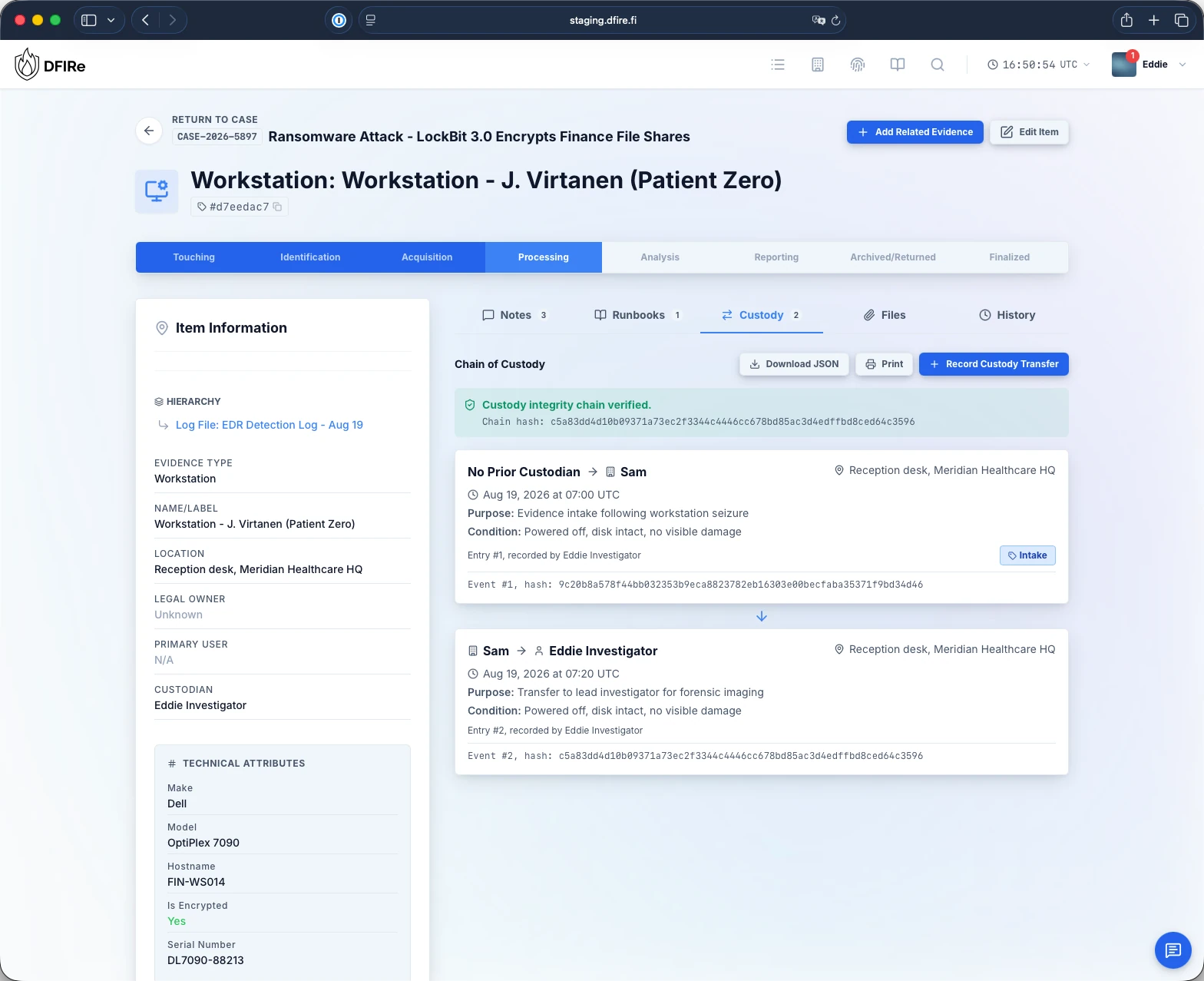
Exhibit 02custody-light.webp
Chain of custody
Digital and physical items share one hierarchy, and each has a custody record you can print and hand over. Every transfer records who, when, where and why, and a hash chain shows that the record is unchanged.
EvidenceEncrypted storage
DFIRe encrypts attachments up to 4 GB with AES-256 under separate tenant, case and item keys. A storage backend on its own gives up nothing readable.
StorageLarge forensic images
Disk images and other large files stream straight to S3-compatible, SMB/CIFS, SFTP or local storage. File size is never the reason evidence ends up off the record.
Evidence typesConsistent timestamps
The whole case uses one timestamp format and handles time zones. Paste a line from a log and the parser reads the time out of it, so entries land in the right order.
Timestamp formatsOffline chain verification
Export a chain as JSON and check it with a short Python script. It needs no DFIRe access, no credentials and no network.
Try the demoKnowledge base
Keep internal procedures next to the cases that use them, control who sees each page, and encrypt the pages that must stay private.
Knowledge base03Intel and integrations
Connect DFIRe to your tools and feeds.
DFIRe connects to the tools you already run and the intelligence you already pay for. All of it is optional, and all of it uses your own keys.
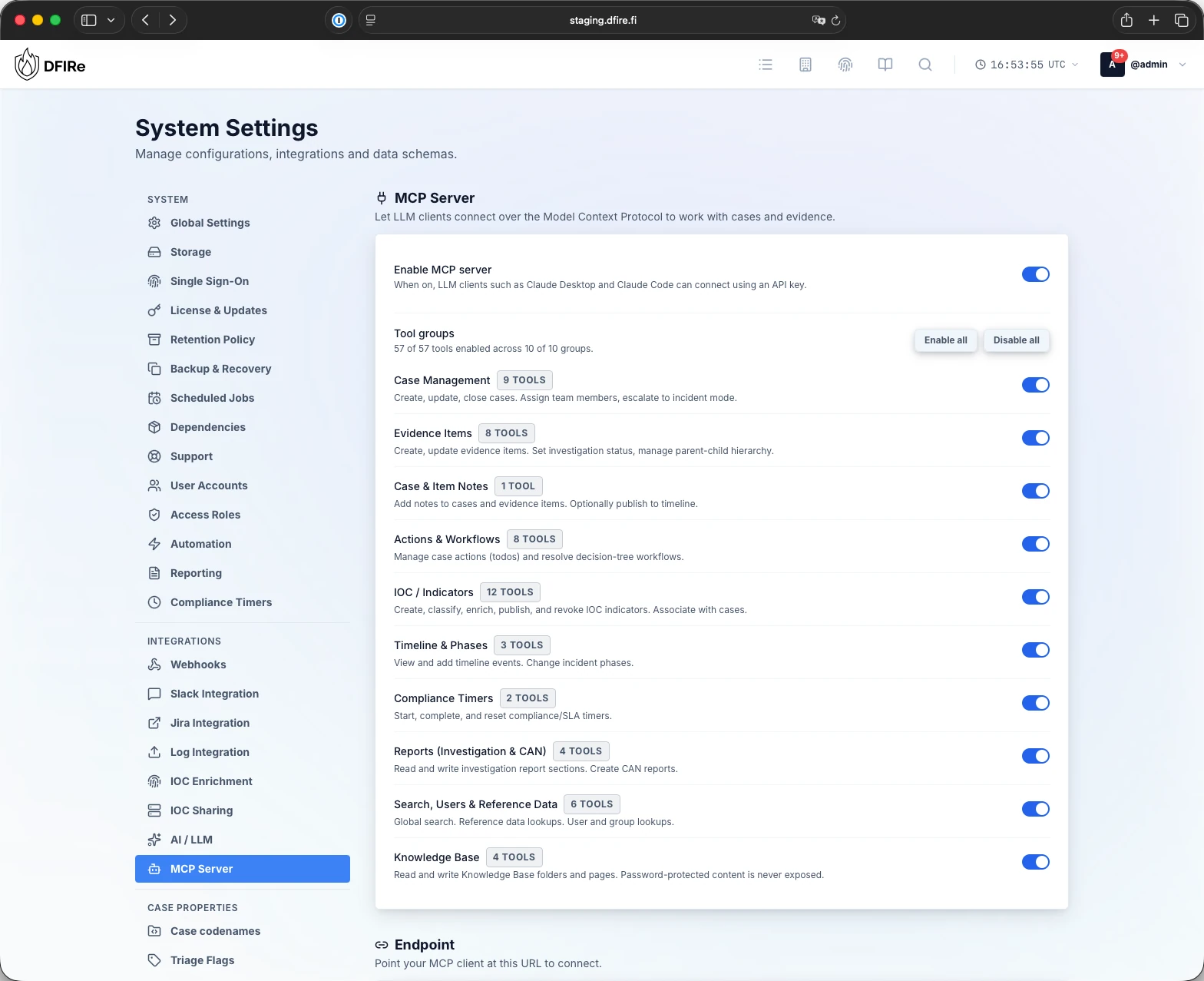
Exhibit 03mcp-light.webp
Indicators and enrichment
Keep indicators on the case and in a registry that spans cases, so the second sighting of something is obvious. Enrichment runs against VirusTotal, AbuseIPDB, AlienVault OTX, Google Safe Browsing, GreyNoise, MalwareBazaar, MISP, Shodan, Spur, ThreatFox, URLhaus and urlscan.io with your own API keys. DNS and WHOIS lookups need no key.
Indicators of compromiseSharing with your CTI platform
Publish what you find. A TAXII 2.1 server and a MISP-compatible feed let your threat intel platform, your partners or your sector CERT pull indicators, scoped per consumer.
FeedsSlack, Jira and webhooks
Coordinate in the channel your team is already in, with case actions available inline. Jira Cloud syncs both ways, and templated webhooks push events to your SIEM, SOAR, XSOAR or XSIAM.
IntegrationsAPI and service accounts
DFIRe has per-user API keys, service accounts and full OpenAPI docs. External systems can create cases, indicators and evidence items, and your own tooling can read what it needs.
API accessOptional AI assistance
AI stays off until you turn it on. It then uses only the provider you pick: Anthropic, Gemini, Gemini in your own Google Cloud project, Azure OpenAI, GitHub Models, any OpenAI-compatible endpoint, or a model on your own hardware. It drafts summaries and report sections. The findings stay yours.
AI integrationMCP server
Let an agent such as Claude Code work a case like any other responder. It has the same role limits and the same audit trail, and you switch its tool groups on one at a time.
MCP server04Running DFIRe
Ready for your security review.
Your platform and security teams will ask these questions before DFIRe reaches production. The documentation answers each one.
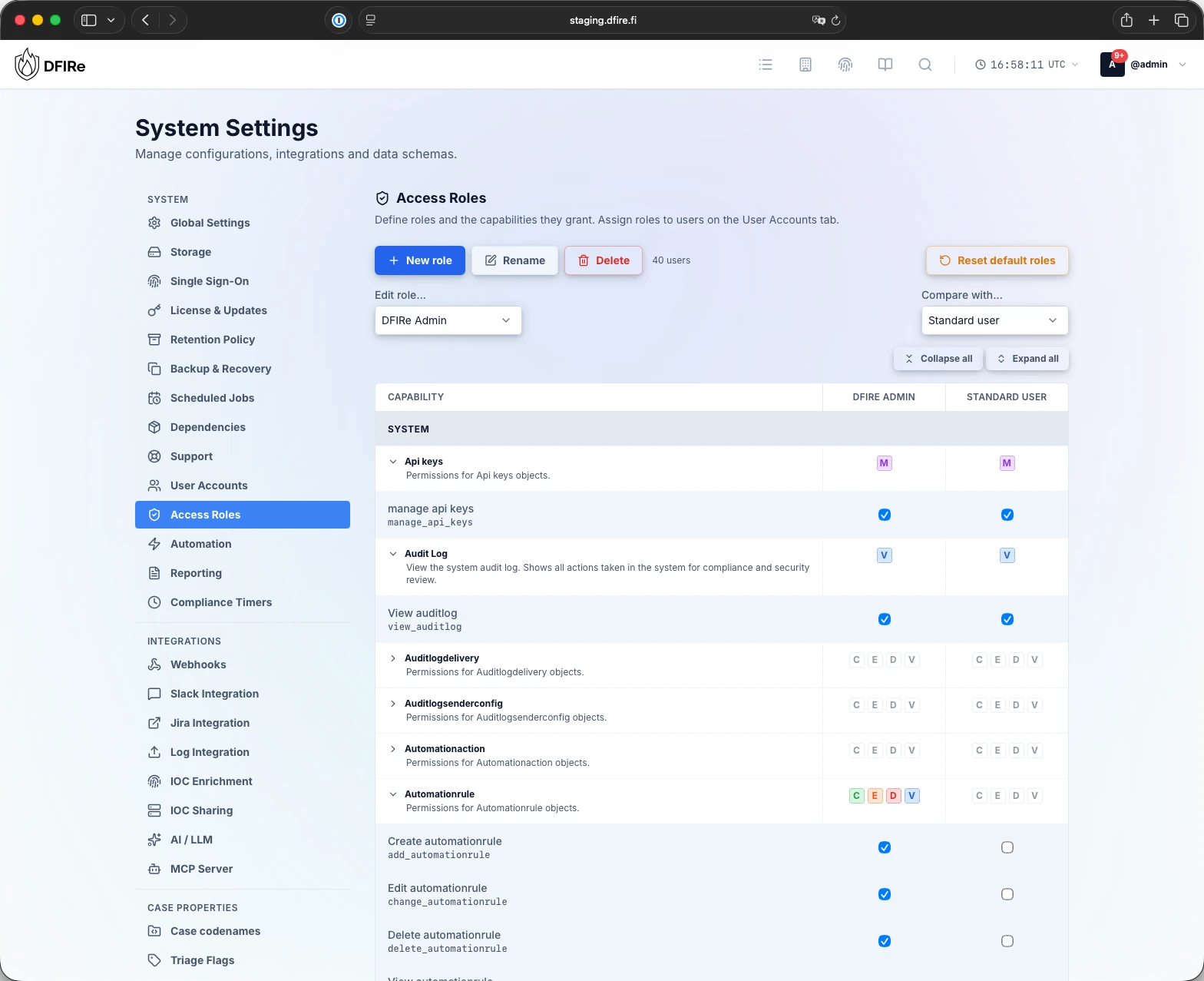
Exhibit 04access-light.webp
Single sign-on
People sign in through your identity provider over OIDC, including Google Workspace and Microsoft Entra ID. Revoke a session at once, and see where each one was used.
Single sign-onGranular roles
Build roles capability by capability and compare two of them side by side before you commit. Access applies per case as well as across the instance.
Users and rolesA fail-closed audit log
DFIRe writes every action to the audit log before the action completes. If that write fails, the action does not happen. Forward entries to your SIEM and keep them under your own retention.
Audit logBackup and restore
DFIRe takes scheduled backups, encrypts them with AES-256-GCM and validates them. A restore takes one step. Backups sit on their own storage target, away from case data.
Backup and recoveryYour infrastructure
DFIRe runs on Docker Compose from a release-pinned bundle, with your own PostgreSQL 16+ and a storage backend chosen per role. With an offline licence it also runs in isolated networks. The vendor has no access to your instance.
DeploymentSupply chain
Every release ships a software bill of materials and build provenance for both images. A written development and disclosure process covers the rest of your security review.
Supply chainTry it on your own hardware.
Install the 90-day trial with two commands. There are no seat counts to declare, and no case data leaves your network.